3DEXPERIENCE Migration in 2026: What’s Changing and What to Watch
ByIlan Madjar, Managing Partner and Senior Consultant, xLM Solutions
In this blog post, xLM’s Ilan Madjar shares key takeaways from a recent Dassault Systèmes technical training – highlighting what’s changing in migration, openness and tooling.
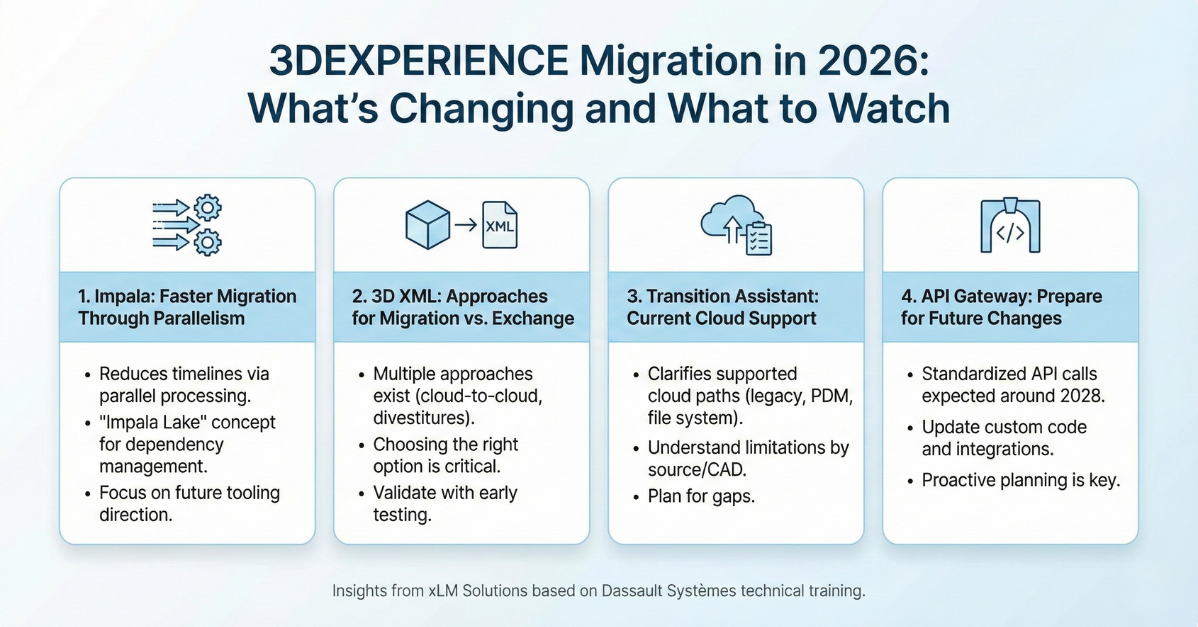
Late November, I attended a Dassault Systèmes technical training in Boston focused on migration, openness (web services) and supporting tools and methodologies. It was a pleasure to join the event and catch up with other Dassault technical partners and system integrators – many of which we’ve known and collaborated with for years.
A lot of the content reinforced what we already apply with customers day-to-day: data cleanup, testing strategy, phased execution and the realities of migrating complex product structures. That said, there were a few areas worth highlighting because they signal where the platform is heading and what customers should plan for.
Below are four takeaways I expect to be most relevant to teams planning a 3DEXPERIENCE transition, a cloud move, or any initiative that touches integration and customization.
1) Impala: Exploring Faster Migration Through Parallelism
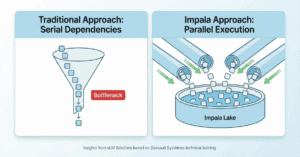
One interesting session introduced Impala, an internal migration tool developed by a Dassault Systèmes team. While not positioned as a broadly available product as in the case of the Transition assist (on-cloud) or EDAT (on-premise) , Impala was presented as an example of how Dassault is thinking about reducing migration timelines through greater parallelism and orchestration. Traditional migration approaches are often constrained by dependency order: if an assembly depends on sub-components, those components must exist before the assembly can be loaded. Even with batching, this “bottom-up” requirement limits how much work can run in parallel and can significantly extend cutover windows. Impala’s approach – described using a concept referred to as an “Impala Lake” – is designed to reduce those dependency bottlenecks and improve throughput. The tool includes orchestration and visibility features intended to manage large-scale migrations more efficiently. Overall, it’s a strong signal of where Dassault’s migration tooling may head in the future. xLM Insight: Understanding tools like Impala is less about adopting them immediately and more about recognizing where Dassault is investing to reduce migration risk and timelines. In practice, we help customers decide when established paths such as EDAT, Transition Assist, or custom frameworks are the right fit – and where emerging concepts may influence longer-term strategy. It is also worth mentioning that Impala has been implemented only in a small number of customers and it should be taken into consideration when planning to use it for migration (assume possible bug fix may delay the process).2) 3DXML: Guidance On Approaches For Migration vs Exchange
3DXML is not new when migrating or exchanging data from one 3DEXPERIENCE platform to another, but the training provided a framework for when and how to use it, particularly for migration scenarios rather than supplier exchange. The key point was that there are multiple approaches supported by 3DXML, and they are not equivalent. Some approaches are better suited for supplier collaboration and limited data exchange. Others were positioned as more appropriate for large-scale migration scenarios such as:- Cloud-to-cloud or tenant-to-tenant movement
- Divestitures and system splits (projects moving to different environments)
- Post-acquisition consolidation
3) Transition Assistant: What Is Supported Today For Cloud Migration
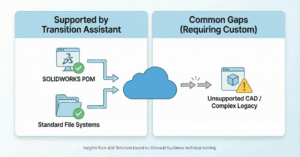
Another useful segment provided a clearer view into what Transition Assistant currently supports for cloud migrations, and where important constraints still exist. At a high level, Transition Assistant was presented as supporting several common cloud migration paths, with specific limitations based on source system and CAD type, including:- Selected legacy system migrations into 3DEXPERIENCE cloud environments (with support limited to specific CAD configurations depending on the source)
- SOLIDWORKS PDM migrations
- Designer Central to UPS (Unified Product Structure) transitions
- File system to cloud migrations for supported CAD types
- ENOVIA SMARTEAM migrations