


A True Workflow for Engineering Change in 3DEXPERIENCE
ByMarc Young, xLM Solutions
In this blog, xLM’s Marc Young shows how using BPM (Business Process Management) in 3DEXPERIENCE replaces tedious approvals in ENOVIA with a true workflow mechanism for managing engineering change.
Managing engineering change in 3DEXPERIENCE often sounds simple: promote a document, physical product or drawing, get approvals, release it. But if you’ve ever tried doing that with ENOVIA’s standard tools, you know how tedious, and limited, it can be. ENOVIA lets you move objects through lifecycles and maturity states like In Work, Frozen, or Released. There is out of the box functionality in 3DEXPERIENC to approve and make changes such as routes and Change Actions (CAs), etc., but it doesn’t provide what most teams really need: a true workflow mechanism that routes tasks, enforces process logic, and manages approvals with flexibility in a true process management tool. That’s exactly the gap we set out to close in a recent demo using Dassault’s Business Process Management (BPM) solution, formerly Interop. For a deep dive into our “Engineering Change & Release Workflow Solution for 3DEXPERIENCE,” click here. Why ENOVIA Isn’t Enough on Its Own Out of the box, ENOVIA can:
- Promote objects to new states
- Support basic approval routes
- Change objects such as CAs, CR, COs
- Conditional logic (e.g. reject and return to an earlier step) flow through different paths based on various conditions
- Group reviews like Change Control Boards (CCB)
- Dynamic assessment of tasks
- Ability to create automated tasks, to call web services and integrate with other systems
- Task ownership and clear accountability
- Automatic enforcement of transitions (so users can’t skip steps)
- Integrated feedback and redlining during review
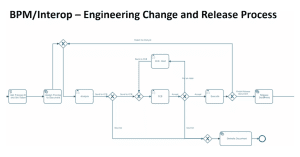
What BPM Brings to the Table
Integrating 3DEXPERIENCE ENOVIA with Dassault’s BPM solution brings a true workflow engine into 3DEXPERIENCE. In the demo, I shared the various functionality:- Triggers automatically when a document moves from In Work to Frozen
- Automatically and/or dynamically assign user to tasks nd allow them to and add information
- Dynamic flow process based on company specific process and their approval decisions
- Allows users to redline documents and attach feedback via 3DEXPERIENCE’s OOTB redline functionality
- Enables rejection, revision, and resubmission — all handled by the system
- Automatically promotes the document to Released once approvals are complete
The Advantage of the Business Process Designer Role
None of this would be possible without the Business Process Designer role in 3DEXPERIENCE. This role unlocks the Process Design application, where we can:- Define triggers (like promotions)
- Map out every step in the workflow
- Set conditions for rejection or approval
- Assign tasks to individuals or groups
- Integrate feedback loops and attachments
A Richer Approval Process
The result is a richer approval process than ENOVIA can provide alone. Instead of chasing people down for sign-offs or dealing with manual routing, the BPM engine ensures:- Tasks go to the right people at the right time
- Users can’t promote objects out-of-sequence
- Every decision is documented
- Revisions restart the process automatically