Widgets to Expand Your Capabilities
ByMarc Young, Founder and Owner, xLM Solutions
As you may know, the 3DEXPERIENCE platform has a bunch of roles and applications that can all be configured.
Widgets, for example, can provide quick access to information such as platform apps, community content, and web content - and can be easily configured.
In the 3DEXPERIENCE, these widgets can be inserted into Dashboards; the dashboards can be created from scratch or from a template and the widgets can be added just by dragging them from the available apps or from any of the four Compass platforms:
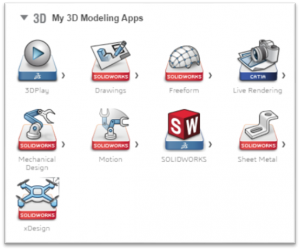 The widgets and their contents can be:
- Shared with other users
- Duplicated
- Added or deleted depending on the necessity
- Displayed on fullscreen
- Moved to other dashboards
- Configurable based on user's needs
- Engineering Release - used for BOM Management and release operations
- Product Structure Editor - Used for BOM Management manipulation and viewing of 3D Data
- Issue Management - Used for creating and managing issues
- 3DPlay - for viewing for various file formats
- Social Analytics - for viewing analytical data from the web
- Create widgets using standard web technologies like HTML5, JavaScript, and CSS
- Draw your widget information from both internal content like 3DSwym, 3DSpace, etc., and external content like YouTube, Weather, RSS Feeds, etc.
- Use different approaches to displaying your widgets
- And much more...