Mastering 3DEXPERIENCE Integration: How xLM Solutions Uses EIF to Connect Enterprise Systems
ByMarc Young, Managing Partner at xLM Solutions
xLM’s Marc Young discusses how to harness the power of 3DEXPERIENCE’s Enterprise Integration Framework (EIF) to connect systems like ERP and SharePoint, streamline workflows, and enhance collaboration across your organization.

Software solutions for product lifecycle management (PLM), enterprise resource planning (ERP), manufacturing execution systems (MES), document management and other purposes are powerful tools for increasing productivity and efficiency within your organization, but allowing them to operate on an island can be counterproductive. Integration is key for ensuring a reliable flow of accurate data to support informed decision-making. At xLM Solutions, we leverage the power of 3DEXPERIENCE’s Enterprise Integration Framework (EIF) to connect Dassault Systèmes’ platform to enterprise systems like ERP and Microsoft SharePoint. This blog will showcase how the EIF simplifies these integrations, using our 3DEXPERIENCE to Microsoft SharePoint Integration Tool as a prime example of our expertise. I also invite you to watch our 3DEXPERIENCE EIF demo video to learn more. What is the Enterprise Integration Framework? The Enterprise Integration Framework (EIF) is a robust technology within the 3DEXPERIENCE platform that facilitates seamless integration with other enterprise systems. It comprises a set of roles, services, and tools that allow organizations to:
- Export and import data between 3DEXPERIENCE and external systems.
- Automate workflows triggered by specific events.
- Conduct large-scale data migrations.
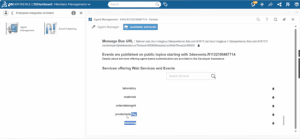 The EIF includes three main roles, each with specific functionalities that enable seamless data flow:
- Enterprise Integration Architect (PFI)
- Agent Management Widget: Create agents to perform automated tasks on behalf of users.
- Event Publishing Widget: Configure event-driven triggers, such as “Promote to Release,” to initiate integrations.
- Enterprise IP Exchange Manager (XXH)
- Handles data exports and imports.
- Uses the Enterprise IP Integration Management Widget to track and manage these operations.
- Enterprise IP Exchange Pack (XXK)
- Includes Enterprise IP Exchange Credits (XXC) required for export operations, offering a scalable approach to integration.
- 1 pack of XXK contains 100,000 XXC credits
- Listens for specified events within 3DEXPERIENCE.
- Pulls CAD data, metadata, and derived outputs.
- Transfers the data to Microsoft SharePoint via its APIs.
- Exports the data and metadata from 3DEXPERIENCE.
- Maps the metadata to SharePoint columns.
- Uploads the data into pre-configured SharePoint libraries.
- Operational Efficiency: Automates tedious data transfer processes, reducing errors and saving time.
- Improved Collaboration: Provides enterprise-wide access to data stored in 3DEXPERIENCE through SharePoint.
- Enhanced Visibility: Uses tools like the Enterprise IP Management App to monitor and analyze job statuses.
- Scalability: Supports cloud and on-premises environments, making it adaptable to any business need.