Using 3DX People & Org, Collaborative Space:
ByIlan Madjar, Managing Partner/Owner, xLM Solutions
Read-only Access to Released Data
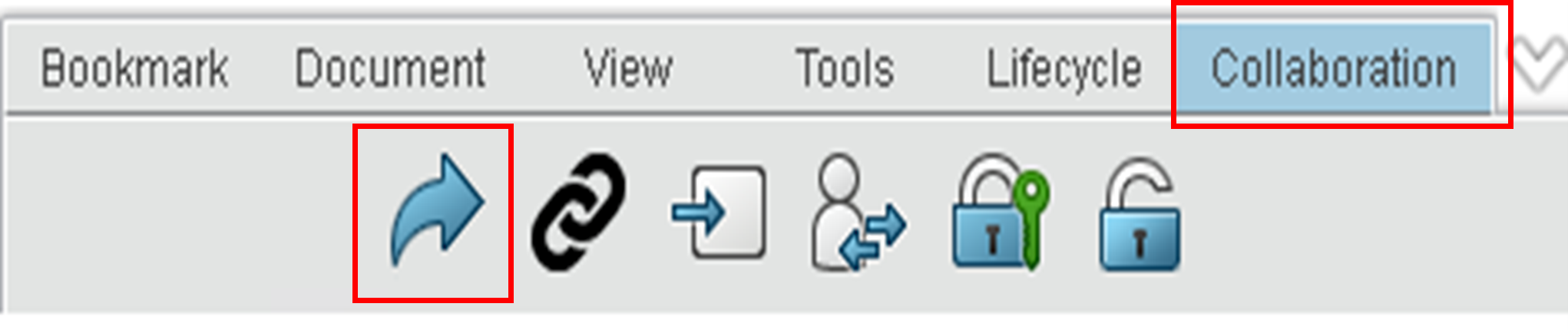
3DEXPERIENCE P&O (People and Organization) is a powerful three-vector security concept (Organization, Collaborative Space, and Role). However, it is a different mindset than the traditional legacy systems’ security models which are focused on roles/groups and data, such as SMARTEAM, SOLIDWORKS PDM and MatrixOne (pre platform era). Adding to it things like restrictive roles, Share command and the IP security module makes it powerful, but it can also be a little intimidating if you are new to the platform or if you are migrating to the platform from a legacy system. The experts at xLM Solutions have broad experience with the 3DEXPERIENCE platform and these models and concepts. Contact us today for consultation and more information. 3DEXPERIENCE Use Cases for Third-Party Read-Only Access In this blog, we will start with a very basic example of how to use 3DEXPERIENCE People & Organization (P&O) and Collaborative Space to allow third-party read-only access (i.e., supplier, customer, etc.) to a released document type (object in 3DX). We will present two basic options using an out-of-the-box set-up with no customization for the scenario. In the coming weeks and months, we will release a series of blogs with other examples of basic use cases of 3DEXPERIENCE P&O, as we believe it is always best to learn by example. We will cover cases of co-design, build-to-print, and “project-based” examples. Scenario: Ability for external users to access (read-only) released data in 3DEXPERIENCE This first option was last tested on 2021X FD08 on-premise. Option 1 – External Access to an Internal Collaborative Space Using Share Command (user-defined share)
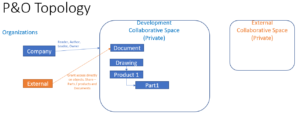
- Organizations (we will create two here or use the out-of-the-box (OOTB) one and create a new one):
- Company Name – Internal organization
- “External Org”
- Collaborative Spaces (again we will create two here):
- Development (example for one or more internal work’s Collaborative Spaces) (Private Collaborative Space)
- “External” (Private Collaborative Space)
- All “External” users would require licenses in the system.
- All external third-party users would be members of “External Org” and have a role (Contributor – can be restrictive for additional control) only in the collaborative Space “External.”
- Create dedicated bookmark/s to share with the third party.
- Access to release data for external third-party users will be provided by the Share command.
- Company users will be required to Share release data as necessary based on the business event/rule.

 Pros/Cons
- Pros: Only the specified release data will be available to the external third party (more restrictive).
- Cons: A user is required to explicitly share data as needed based on rules, unless automation (customization by rules) is applied.
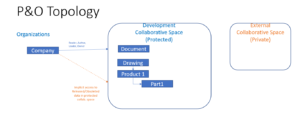
- Organizations (only use OOTB Organization):
- Company Name – Internal organization
- Collaborative Spaces (Create two same as in Option 1):
- Development (example for one or more internal work’s Collaborative Spaces) (Protected Collaborative Space)
- “External” (Private collaborative Space dedicated for third party security context)
- All “External” users would require licenses in the platform.
- All external third-party users would be members of “Company Name” and have a role (Contributor) only in the collaborative Space “External.”
- Access to ALL released and obsoleted data for external third-party users will be provided by being members of the same Organization
 Pros/Cons
- Pros: All released data is shared. No need for manual or automated share process.
- Cons: All released data is shares. Can’t be limited to specific objects.
- Anyone in the same Org will be able to see the data
- It is possible to share multiple objects in the platform
- New revision automatically carries over the share. Users need to remove it until the new revision is released again (last tested on 2021X FD08)