XLM INTRODUCES INDUSTRY STANDARD TOOLKIT FOR MIGRATING DATA TO 3DEXPERIENCE ON CLOUD
ByAllauddin Ali Ahmad, Chief Technology Officer and Solutions Architect, xLM Europe
Configurable solution from xLM helps all industries accelerate digital transformation and migrate non-CAD data from legacy systems to the 3DEXPERIENCE platform on Cloud with ease.
As technology advances, many organizations are finding they must either embrace digital transformation to remain competitive or risk being left behind. The adoption of cloud technology is an essential part of any digital strategy and, as more companies prepare or advance plans to move to cloud environments, it becomes imperative for them to navigate the challenge of handling data from existing systems.
Our team at xLM had an exciting opportunity to assist a customer with this increasingly common set of challenges. In doing so, we developed a set of tools for loading and updating non-CAD data into the 3DEXPERIENCE platform on Cloud and quickly realized the utility of our solution for the broader market. Our team leaned into the challenge and ultimately developed an industry standard toolkit known as the xLM Cloud Import Tool. Details follow.
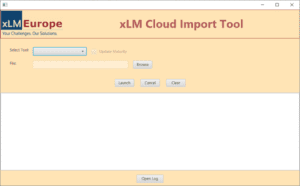
Figure 1: Application GUI
Unpacking the xLM Cloud Import Tool for 3DEXPERIENCE on Cloud The xLM Cloud Import Tool is comprised of four unique components:- Document Classifier:
- Classify documents under a given classification path.
- Update class attribute values for classified documents per classification.
- Document Updater:
- Update document attribute values.
- Set the target revision of the document.
- Release the document.
- Document Linker:
- Create attachment links for specified documents with either Document or Physical Product.
- Alternate Parts Loader:
-
- Create Engineering items.
- Update attribute values.
- Set the target revision.
- Release the Engineering item.
- Create Alternate Links.
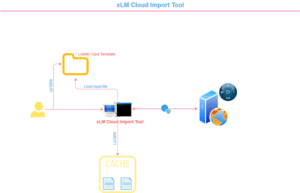
Figure 2: Architecture

Figure 3: Performance
Technical Considerations for Developing the xLM Cloud Import Tool Building a highly configurable import tool that can be modified for specific use cases presented a unique set of challenges, but our team loves solving problems and took pride in planning ahead for potential technical constraints. For example, the ideal solution needed to handle more than a few hundred objects. We needed to optimize it for thousands of objects and considered technical challenges for mass loading/updating such as:- What if the connection is lost to the 3DX cloud server during the import tool run?
- What if the client network is interrupted during the import tool run?
- What if the input file contains bad data causing API failure?
- What if there’s an unexpected error?
- 3DEXPERIENCE platform on Cloud publishes public REST APIs to interact with the platform
- Usage of custom web service is restricted in 3DEXPERIENCE platform on Cloud
- Client application must authenticate itself to interact with the platform